






Industrial hinges, handles and latches for OEM equipment.
- +86 13720060320


How Laptop Hinges Work: Torque & Quality Checks
A laptop screen may look stable when the device is new but later begin to wobble, drift backward, feel uneven, or place visible stress on the display housing. These symptoms are often described as a “bad hinge,” but the hinge mechanism is only one possible cause. Loose screws, cracked mounting bosses, flexible brackets, housing deformation, and uneven left-to-right alignment can produce similar symptoms.
This guide explains how laptop hinges work, what a well-designed hinge should feel like, how OEM engineers and buyers can evaluate hinge quality, and how to distinguish internal hinge wear from damage in the surrounding mounting structure.
The focus is functional behavior and quality verification. Projects that require changes to shaft dimensions, bracket geometry, opening limits, materials, or target torque should follow a separate custom laptop hinge design process.
Quick Answer: How Does a Laptop Hinge Work?
A laptop hinge uses controlled friction around a shaft or pivot to resist screen movement. The resistance must be high enough to keep the display at the selected angle, but low enough for the user to open and reposition the screen without overloading the brackets, screws, plastic mounting bosses, or display housing.
When the screen moves, internal friction surfaces rotate against each other under a preset preload. This creates torque. After the user releases the screen, the same friction helps resist gravity and prevents the display from falling freely.
A successful laptop hinge therefore has to balance two competing requirements:
- Enough holding torque to prevent screen drift and excessive wobble
- Low enough operating force to avoid damaging the surrounding mounting structure
Higher torque is not automatically better. A hinge that feels very stiff may transfer excessive force into the screws, brackets, plastic inserts, or display cover every time the laptop is opened.
Torque hinge function demonstration showing controlled rotational resistance and angle holding.
What Parts Make Up a Laptop Hinge Assembly?
A complete laptop hinge system includes more than the rotating shaft. Evaluating only the hinge component can overlook the actual source of screen movement or structural damage.
| Component | Main function | Typical risk |
|---|---|---|
| Torque shaft or pivot | Creates the rotation axis and controlled resistance | Wear, free play, uneven torque, or torque loss |
| Friction and preload structure | Maintains pressure between internal friction surfaces | Preload relaxation, sticking, or torque variation |
| Display-side bracket | Connects the hinge to the screen assembly | Bending, cracking, or poor load distribution |
| Base-side bracket | Connects the hinge to the laptop chassis | Loose screws or deformation around the mounting points |
| Fasteners and inserts | Transfer hinge force into the housing | Screw loosening, insert pullout, or cracked plastic bosses |
| Rotation stop | Controls the maximum screen opening angle | Impact loading or concentrated stress at full opening |
| Cable-routing area | Allows display, camera, antenna, or power cables to cross the hinge zone | Cable abrasion, pinching, or added rotational resistance |
The hinge, brackets, fasteners, and housing must work as one load path. A durable torque shaft cannot protect a weak plastic mounting boss if the operating force is too high or the bracket concentrates force into a small area.
How a Laptop Hinge Holds the Screen at an Angle
Laptop hinge performance cannot always be described by one torque number. Several types of resistance affect how the screen feels during opening, adjustment, and angle holding.
Holding Torque
Holding torque is the resistance that helps the screen remain stationary after the user releases it. If the available holding torque is too low for the screen mass and center-of-gravity position, the display may slowly drift backward or fall toward the keyboard.
Breakaway Torque
Breakaway torque is the force required to start moving the screen from rest. Excessive breakaway torque can make the screen feel stuck before it suddenly jumps. This behavior may also increase peak stress on the display cover and base mounting points.
Running Torque
Running torque is the resistance felt while the hinge is already rotating. Stable running torque creates a controlled, predictable motion. Large changes in resistance can make the screen feel rough, uneven, or inconsistent through the opening range.
Left-to-Right Torque Balance
Many laptops use a left and right hinge pair. The two hinges do not have to be perfectly identical in every internal detail, but the complete assembly must move without twisting the screen or forcing one side of the housing to carry most of the load.
There is no universal torque value for every laptop. Required torque depends on screen mass, center-of-gravity distance, hinge spacing, opening geometry, display size, bracket stiffness, cable resistance, and the desired operating feel.
The broader relationship between friction, holding torque, and free-stop positioning is explained in our torque hinge working principle guide. This page remains focused specifically on laptop screen behavior and quality diagnosis.
What Should a Good Laptop Hinge Feel Like?
A quality review should evaluate the complete movement rather than judging the hinge only by whether it feels tight.
| Check | Expected behavior | Possible warning sign |
|---|---|---|
| Starting movement | The screen begins moving smoothly and predictably | Sticking followed by a sudden jump |
| Running movement | Resistance remains reasonably consistent through the intended range | Rough spots, sudden changes, or one side moving first |
| Angle holding | The screen remains stable at normal working angles | Slow backward drift or uncontrolled closing |
| Screen wobble | The display settles quickly after normal touch input | Repeated oscillation or visible free play at the hinge axis |
| Left-right balance | Both sides move without twisting the display assembly | One side lifts, bends, or moves before the other |
| Noise | No persistent clicking, grinding, or cracking sound | Noise that increases with opening force or angle |
| End stop | The screen reaches its limit without a severe impact | Hard stopping that flexes the housing or brackets |
A very stiff screen may appear stable during a quick inspection, but excessive operating force can shorten the life of the complete mounting system. Quality should be judged by balance, consistency, structural compatibility, and long-term stability—not by stiffness alone.
Laptop Hinge Quality Checklist for OEM Buyers
OEM buyers should request test conditions and acceptance limits that match the actual laptop project. A sample hinge tested by hand without the real brackets, display mass, cables, and housing may not represent production behavior.
1. Torque Consistency
- Measure resistance through the required opening range.
- Check whether breakaway torque is much higher than running torque.
- Compare the left and right hinge behavior where a pair is used.
- Define the allowable torque tolerance for production parts.
- Repeat the measurement after the specified cycling test.
2. Angle-Holding Test
Install the hinge in a representative assembly and stop the screen at several working angles. Include the angle where gravity creates the highest turning moment. Observe whether the screen remains stationary or slowly moves after release.
3. Wobble and Free-Play Test
Move the top of the display gently while observing the hinge shaft, brackets, screws, and surrounding housing. This helps identify whether the movement originates inside the hinge or from flexing and looseness in the mounting structure.
4. Cycle Test
The required number of cycles and acceptable torque-loss limit should come from the laptop manufacturer’s project specification. A cycle result is only meaningful when the test records the screen load, opening range, operating speed, temperature, fixture alignment, and pass/fail criteria.
After cycling, review:
- Holding torque and screen drift
- Breakaway and running feel
- Noise or rough movement
- Radial or axial free play
- Bracket deformation
- Fastener condition
- Damage around plastic bosses or metal inserts
5. Mounting-Strength Test
The hinge should be tested with the intended bracket, screws, inserts, and housing material. A hinge may meet its own torque specification while the surrounding structure cracks, pulls out, or permanently deforms.
6. Cable-Routing Review
Display and antenna cables can add resistance, pull the screen away from its intended position, or become damaged during repeated opening. Prototype testing should include the actual cable bundle or a representative equivalent.
Why Do Laptop Hinges Become Loose or Uneven?
Loose or uneven screen movement can develop from wear inside the hinge, but it can also originate from the brackets and housing. The observed symptom should be traced through the complete assembly.
| Observed symptom | Possible causes | What to inspect |
|---|---|---|
| Screen slowly falls backward | Torque loss, insufficient initial torque, or increased screen load | Holding torque, screen mass, cable pull, and cycle history |
| Screen starts with a sudden jump | High breakaway torque, contamination, or uneven internal friction | Starting force and movement through the first few degrees |
| One side is tighter than the other | Torque mismatch, shaft misalignment, or bracket distortion | Left-right movement, hinge axis, and mounting surfaces |
| Clicking or cracking sound | Loose screw, cracked boss, moving insert, or damaged bracket | Mounting points while the screen is opened slowly |
| Display housing separates near the hinge | Excessive operating force or failed mounting structure | Plastic bosses, threaded inserts, screws, and bracket edges |
| Screen continues to wobble | Hinge free play, flexible brackets, or weak housing connection | Movement at the shaft compared with movement at the housing |
| Resistance changes through the angle | Misalignment, cable interference, or irregular friction behavior | Cable path, hinge axis, brackets, and rotation stop |
A stiff hinge can be part of the failure chain. If the torque is higher than the supporting structure can tolerate, repeated opening may loosen screws, crack mounting bosses, bend brackets, or separate the display cover even though the hinge itself still feels tight.
Hinge Failure or Mounting Failure?
Separating internal hinge wear from mounting damage helps avoid replacing the wrong component or repeating the same failure in a new design.
Signs More Consistent With an Internal Hinge Problem
- Visible free play at the rotating shaft while the brackets remain fixed
- Holding resistance has noticeably decreased
- One hinge has a different rotational feel from the other
- Movement is rough even when the hinge is removed from a distorted housing
- Noise appears to come directly from the shaft or friction mechanism
Signs More Consistent With a Mounting-Structure Problem
- Screws or inserts move relative to the housing during opening
- Plastic bosses are cracked or separated from the surrounding structure
- The hinge bracket lifts away from the base or display cover
- The screen wobbles even though the rotating shaft has little free play
- The housing visibly flexes before the hinge begins to rotate
- The opening force changes when mounting screws are tightened or loosened
For an OEM project, both conditions should be tested together. Replacing a damaged housing with the same weak geometry or reinstalling an excessively stiff hinge may cause the failure to return.
Common Laptop Hinge Layouts Seen During Inspection
Laptop hinge layouts vary between manufacturers. During inspection, the layout helps determine where to check for unequal torque, bracket movement, housing deflection, and free play.
| Layout | What to inspect |
|---|---|
| Left-and-right hinge pair | Torque balance, coaxial alignment, bracket movement, and twisting of the display housing |
| Single-center hinge | Bracket stiffness, free play at the center joint, and load distribution into the chassis |
| Dual-axis mechanism | Free play, torque consistency, stop behavior, and mounting movement on each axis |
This section describes what to observe during a quality inspection. It is not intended as a complete comparison of laptop hinge architectures or a guide to selecting a new custom mechanism.
Example From the HTAN Product Range
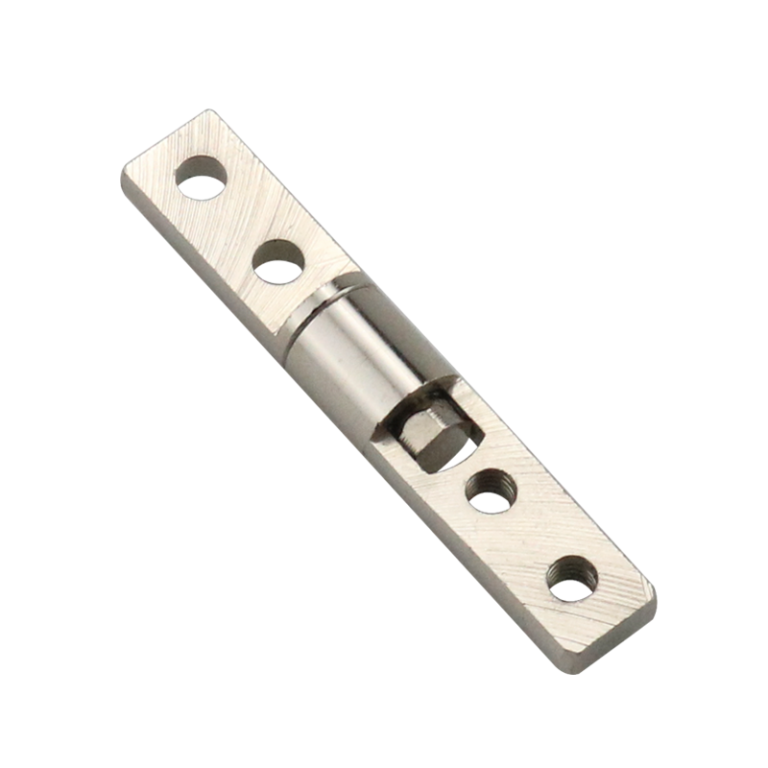
The HT302-1W is an example of a compact round-bar torque hinge used in laptop and display mechanisms.
| Model | HT302-1W |
|---|---|
| Material | Iron |
| Torque range | 0.3–5.0 N·m |
| Surface treatment | Vibration light |
| Typical application | Laptop and display mechanisms |
| Customization | Available according to project requirements |
This specification is a product example, not a universal torque recommendation for every laptop. The correct hinge behavior must still be verified with the actual screen mass, center-of-gravity position, housing structure, bracket stiffness, cable routing, and required operating feel.
See the available laptop round-bar torque hinge model for product-specific information and project inquiries.
What to Record During a Laptop Hinge Quality Test
A quality-test result should identify the complete test assembly and operating conditions. Recording only the hinge model and cycle count makes it difficult to compare results or diagnose later failures.
| Test record | What to document |
|---|---|
| Test assembly | Screen, brackets, fasteners, inserts, housing, and cable bundle used during the test |
| Screen load | Complete display assembly mass used in the test fixture |
| Opening range | Minimum and maximum tested angles |
| Hinge arrangement | Left-and-right pair, center hinge, or dual-axis mechanism |
| Cycle condition | Cycle count, operating speed, temperature, and fixture orientation |
| Initial condition | Starting feel, holding behavior, wobble, noise, and mounting condition |
| Final result | Torque change, screen drift, free play, noise, fastener movement, and housing damage |
| Acceptance decision | Project pass/fail limits and the reason for rejection where applicable |
Projects that require changes to shaft dimensions, bracket geometry, opening limits, or target torque should be transferred to a separate hinge development review rather than treated as a quality-test correction.
FAQ
How does a laptop hinge keep the screen in position?
The hinge uses controlled friction and preload around a shaft or pivot. This creates resistance that helps the screen remain at the selected angle after the user releases it.
Why does a laptop screen wobble even when the hinge feels tight?
The movement may come from flexible brackets, loose screws, cracked mounting bosses, moving inserts, or housing deformation rather than free play inside the hinge shaft.
Is a stiffer laptop hinge always better?
No. Excessive torque can increase stress on brackets, screws, plastic mounting bosses, and the display housing. The hinge must balance angle holding with acceptable operating force.
Why does one laptop hinge feel tighter than the other?
Possible causes include left-right torque variation, shaft misalignment, bracket deformation, uneven fastener tightening, housing distortion, or cable resistance near one hinge.
How should an OEM evaluate laptop hinge quality?
Evaluate torque consistency, breakaway and running feel, angle holding, wobble, left-right balance, cycle performance, mounting strength, cable routing, and the condition of the complete housing assembly.
Conclusion
A laptop hinge works by creating controlled resistance around the screen pivot, but the quality of the finished laptop depends on more than the hinge shaft alone. The brackets, screws, inserts, housing, rotation stop, and cable path must all support the repeated opening force without loosening or deforming.
A good laptop hinge should hold the display at normal working angles, begin moving without a sudden jump, maintain reasonably consistent resistance, and avoid transferring excessive stress into the surrounding structure. When wobble, noise, or housing separation appears, inspect both the hinge and its mounting points before identifying the failed component.
HTAN can review laptop hinge quality problems using the complete test assembly, opening range, cycle conditions, torque behavior, bracket movement, cable routing, and observed failure symptoms. Submit your laptop hinge requirements together with the available drawings, samples, and test records.